
You can keep track of your performance on Google Maps using the Local Search Ranking feature, which will help you to gain a better understanding of how well your brand ranks for the search terms that matter most to you.
Setting up Search Terms
To use the Local Search Ranking feature, first you need to set up one or more search terms to track.
Note: you must ensure that this feature is enabled in your account, if you don’t see the following options, reach out to our team for more information.
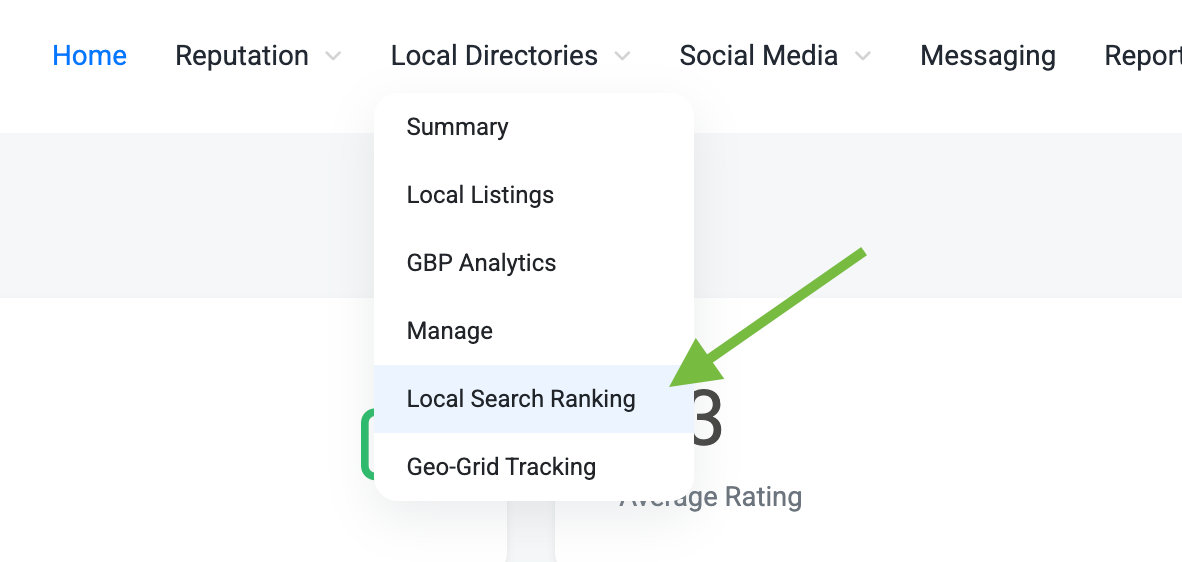
First, navigate to the Local Search Ranking page, under the Local Directories tab in the dashboard:
From the Local Search Ranking page, click on the button for Manage Search Terms in the top right section of the page:

From here, you will see a page that lists any search terms that you have set up (it will be empty if you don’t have any yet). To set up a new Search Term Group, click on the Add New Search Term Group button:

What is a Search Term Group? A Search Term Group allows you to set up multiple search terms, for as many of your business as you would like, and keep track of the rankings together. This makes it easier to set up multiple terms for multiple businesses all at once.
This will take you to the Add New Local Search Term Group page, where you can set up new search terms to track. The page has the following options:
Local Search Term Group Name: the name of the grouping of search terms.
Select Search Terms: the search terms that you would like to track.
Select Businesses or Groups: the businesses or groups that you would like to track the search terms for.
Search Term Locations: the geographic location that you would like to use as the center point of each search term, for each business selected.
Update Frequency: how often you would like the search term results to update.
Time of Day: the time of day that you would like the search term results to update (this has an impact on the rankings, since Google rankings may change at different times).
Day of Week: the day of the week that you would like the search term results to update.
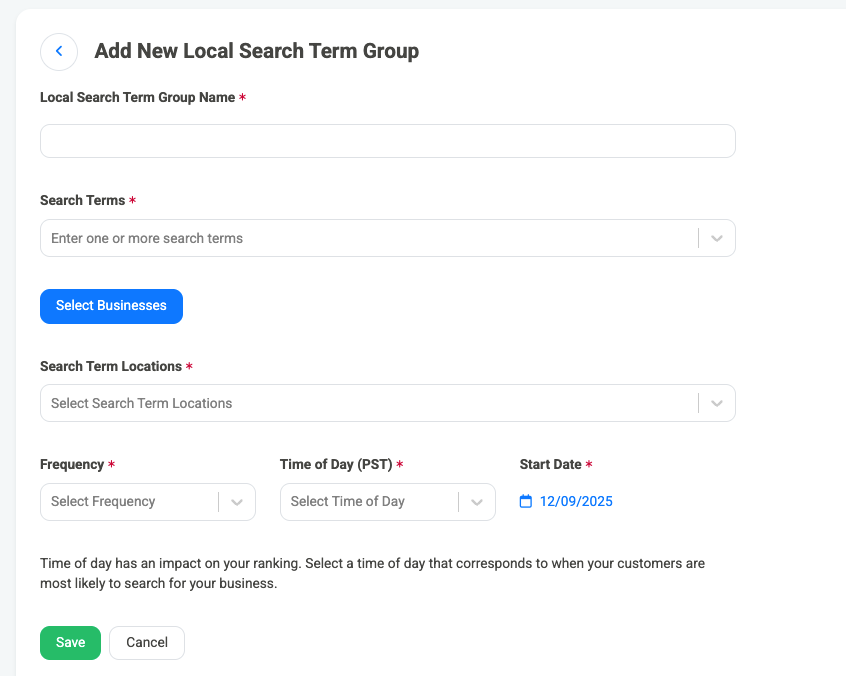
Once you have selected all of the details that you would like for your search term group, hit the Save button to begin tracking results. The results will begin to show in the dashboard after the selected time and day of the week that they are set to track for.
Tracking Search Terms on the Local Search Ranking Page
Once you have some search terms set up to track, results will begin to appear on the Local Search Ranking page. Results are grouped in a few different ways:
Top Search Term Groups by Average Local Search Ranking: This shows various ranking metrics grouped by Search Term Group.
Top Search Terms by Average Local Search Ranking: This shows various ranking metrics grouped by each individual Search Term, so it is easier to see a breakdown of the performance of each term being tracked.
Top Businesses by Average Local Search Ranking: This shows various ranking metrics grouped by each individual Search Term, so it is easier to see how each business is performing across all of the terms being tracked for it.
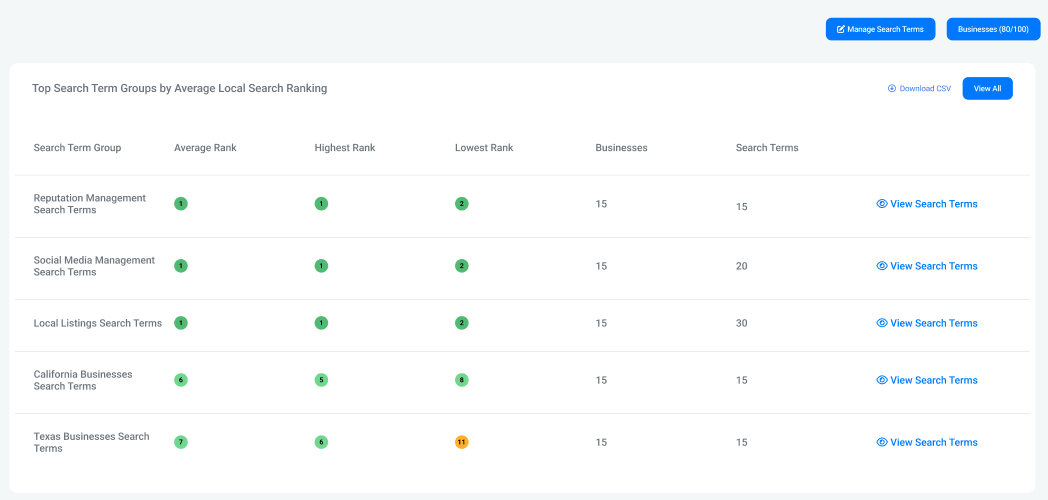
Each section also has a View All button, which allows you to see a view of all Search Term Groups, Search Terms, and Businesses if you would like to. Each one also has the option to zoom in on that particular item to explore it in more depth with the “View” option in each row.
For Search Term Groups, this is a View Search Terms button, which shows you a breakdown of all Search Terms in that group. For Search Terms, this is a View Businesses button, which shows you a list of all businesses that the term is being tracked for. For Businesses, it is a View Search Terms button, which shows you a breakdown of all search terms being tracked for that business.
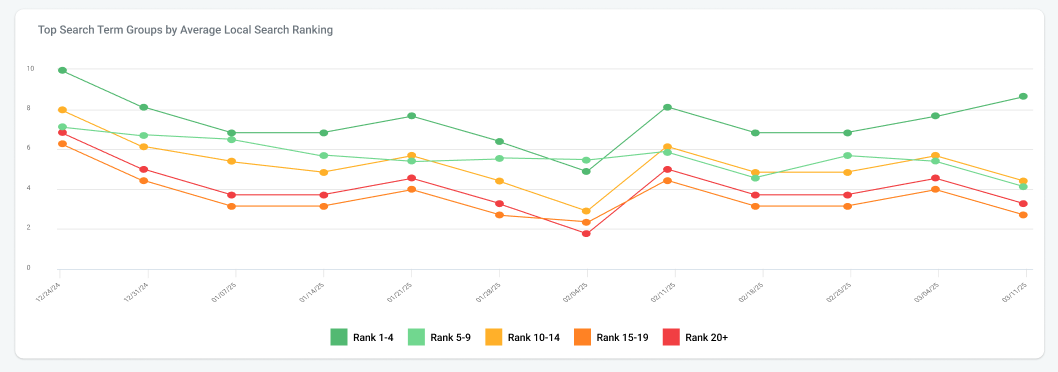
The line graphs on this page show a breakdown of how many of each type of grouping is ranking at which position (for example, how many Search Term groups have a rank of 1, or 2, or any other ranking number).
Search Ranking Report Segments
There are also a few different report segments that you can use to track your Local Search Ranking performance over time:
Local Search Ranking - Top Search Term Groups: This shows the performance of Search Term Groups for the selected reporting period.
Local Search Ranking - Top Search Terms: This shows the performance of individual search terms for the selected reporting period, across all businesses that are tracking that search term.
Local Search Ranking - Top Businesses: This shows the performance of each business across all search terms being tracked for that business for the selected reporting period.
Local Search Ranking - Ranking Breakdown: This tracks the performance of each search term, for each business that is tracking the term in the reporting period.